DeployManage, server management for any cloud
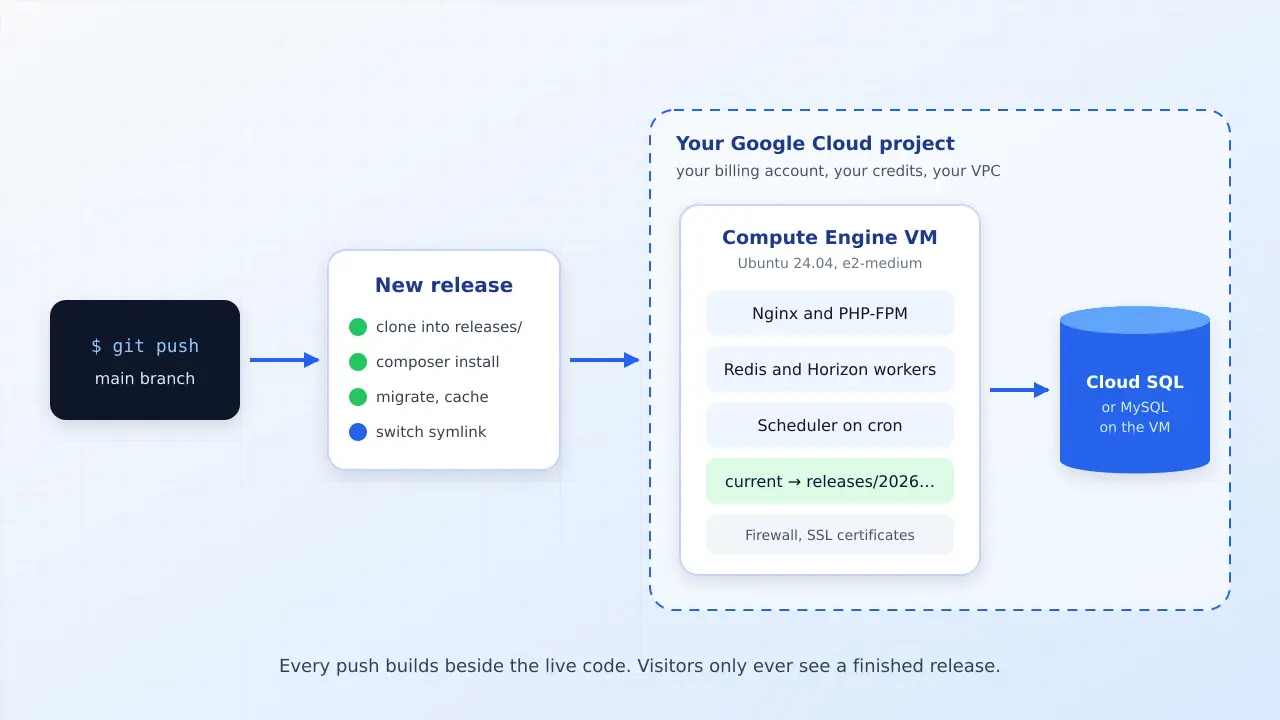
Create an Ubuntu VM in your own Google Cloud project, run one install command and DeployManage turns it into a Laravel server with Nginx, PHP-FPM, Redis and Supervisor. Every push ships as an atomic release, Horizon restarts on its own, and the bill for the machine stays on your Google Cloud invoice where your credits and committed use discounts apply.
One-time demo, no credit card required.
Compute Engine, Cloud Run, Cloud SQL and network prices read from Google Cloud's pricing pages for Iowa (us-central1) in October 2026. Forge and Ploi prices from their own pricing pages.
| Server | Provider | Load |
|---|---|---|
|
web-01.prod
fsn1
|
Hetzner |
32%
|
|
web-02.prod
fsn1
|
Hetzner |
47%
|
|
db-01.prod
fra1
|
DigitalOcean |
18%
|
|
worker-01
eu-central-1
|
AWS |
61%
|
|
mail-01
gra
|
OVHcloud |
9%
|
The cheapest dependable way to deploy Laravel to Google Cloud is a single Compute Engine VM: an e2-medium with 4 GB of memory, a 50 GB disk and a public IPv4 address costs $33.11 a month in Iowa before traffic. Cloud Run can host Laravel too, but an always on web container, a worker pool for queues and a Cloud SQL instance come to about $102 a month for a smaller app. Laravel Forge has no Google Cloud integration and treats a Compute Engine VM as a custom VPS. DeployManage adds a Google Cloud VM with one install command and deploys with atomic releases from $59 a month.
Most Laravel teams land on Google Cloud for a reason that has nothing to do with PHP: startup credits, a company wide Google contract, a data team already living in BigQuery, or a client whose security review names one cloud. The app has to run there, and the bill has to land on that account.
Google's own tutorials then point at Cloud Run, which means a Dockerfile, a separate worker pool for queues, Cloud SQL for the database and Memorystore for Redis. A single Compute Engine VM runs the whole Laravel stack the way the framework docs describe it, and a panel takes care of the server work you would otherwise script by hand.
Create an Ubuntu 24.04 VM in the Google Cloud console, open a root shell and paste the install command the panel shows you. It installs Nginx, PHP-FPM with the extensions Laravel needs, MySQL or Postgres, Redis, Composer, Node and Supervisor, then hands control to the panel over SSH.
Each deploy clones your branch into a new release folder, runs composer install, your build, migrations and cache commands there, then switches the live symlink in one step. A failed step never reaches visitors. Atomic releases and push to deploy are on the Growth and Business plans.
Queue workers and Horizon run under Supervisor on the same VM and restart after each release. The Laravel scheduler runs from cron. Nothing to split into a second service with its own bill.
Let's Encrypt certificates are issued and renewed per site. The server firewall keeps only SSH, HTTP and HTTPS open, on top of whatever rules you set in your VPC network.
Compute Engine VMs sit in the same server list as DigitalOcean and Hetzner servers created through their APIs and machines at AWS, Vultr or Linode added the same way as Google's. One login, one deploy routine, whatever the invoice says.
Give each developer and contractor their own login instead of adding them to the Google Cloud project. Starter includes 2 members, Growth 10 and Business unlimited, and every deploy and server change is recorded against the person who made it.
In Compute Engine pick an E2 machine in a US region such as us-central1 or us-east1, choose Ubuntu 24.04 LTS as the boot disk and tick Allow HTTP traffic and Allow HTTPS traffic. Reserve the external IP address so it survives a restart.
Add the server in DeployManage as a custom server and copy the command it shows. Open the VM with the SSH button in the console, switch to root with sudo -i and paste it. The panel reports progress while the stack installs.
Choose the General PHP / Laravel project type, pick PHP 8.1 to 8.4, connect GitHub, GitLab or Bitbucket and paste your .env once. It is shared across every release.
Press Deploy or push to the branch. The release builds beside the live code and goes live only when every step has passed. Point your DNS at the VM's external IP and issue the certificate.
Three of these columns run inside your own Google Cloud project, so credits and commitments apply. The managed Laravel platform in the last column does not. Prices are monthly list prices in USD.
swipe to see all columns →
| What you are comparing | DeployManage on Compute Engine | Cloud Run | Laravel Forge on Compute Engine | Ploi on Compute Engine | Laravel Cloud |
|---|---|---|---|---|---|
| Runs in your Google Cloud project | Yes, on your VM | Yes | Yes, as a Custom VPS | Yes, as a custom server | No, it runs on its own AWS infrastructure |
| How the server is added | One install command as root | No server, you ship a container image | Custom VPS, needs a fresh Ubuntu 24.04 or 26.04 with root SSH enabled | Custom server install | Nothing to add |
| Software price | $59, $129 or $299 a month, half price billed yearly | No panel fee, usage only | $12, $19 or $39 a month | $10, $16 or $36 a month | $5, $20 or $200 a month plus usage |
| Zero downtime releases | Yes, Growth and Business | Yes, traffic shifts to a new revision | Yes, one server per site | Yes, from the Pro plan | Yes |
| Queue workers and Horizon | Supervisor on the same VM | Separate worker pool, billed on its own | Managed on the server | Managed on the server | Worker clusters, billed on their own |
| MySQL and Redis | On the VM, or Cloud SQL if you prefer | Cloud SQL and Memorystore, both extra | On the server | On the server | Managed add ons, metered |
| Writable local disk and SSH | Yes | No SSH, files are held in memory per instance | Yes | Yes | Managed by the platform |
| Best for | Teams and agencies that need seats, an activity log and several servers | Stateless APIs that sit idle most of the day | One developer or a small team on a budget | Budget teams with up to 10 servers | Teams that do not need to be on Google Cloud |
Credits pay for Compute Engine hours, disks and traffic. A panel fee is the only cash cost, and the app runs like any other Laravel server, so moving off Google Cloud later is a database dump and a DNS change.
The client owns the project and the invoice. You add their VM to the same panel as your DigitalOcean and Hetzner servers and deploy it the way you deploy everything else.
Keeping the Laravel app in the same cloud and region as the warehouse avoids cross cloud transfer fees and lets the VM use a service account instead of exported keys.
Uploads that vanish on redeploy, a worker pool that needs its own configuration and no shell to run tinker in. A VM gives all three back for less money at steady traffic.
You have three realistic routes: a Compute Engine VM, Cloud Run, or App Engine. A Compute Engine VM is a normal Linux server, so Laravel runs on it exactly as the framework documentation describes, with Nginx, PHP-FPM, MySQL, Redis and Supervisor on one machine. Cloud Run runs your app as a container that Google starts and stops for you. App Engine is the older managed runtime and most current guides have moved on from it.
For an app with a queue, a scheduler, file uploads and a database, the VM is the shortest path. You create the machine, install the stack (by hand, with a script, or with a panel) and deploy from git. Cloud Run suits a stateless API with uneven traffic, because request based billing charges nothing while no request is being handled. The moment the app needs an always on worker, a database and Redis, each of those becomes a separate Google product with its own line on the bill.
If you are deciding between clouds rather than routes, the same reasoning is laid out for Amazon on the deploy Laravel to AWS EC2 page.
A production Laravel app on a single Compute Engine VM costs about $19 to $33 a month before traffic, depending on memory. These are Google's on demand prices for Iowa (us-central1), multiplied by 730 hours, read in October 2026.
| Item | Spec | Monthly price |
|---|---|---|
| e2-micro | 2 shared vCPU, 1 GB | $6.11 |
| e2-small | 2 shared vCPU, 2 GB | $12.23 |
| e2-medium | 2 shared vCPU, 4 GB | $24.46 |
| e2-standard-2 | 2 vCPU, 8 GB | $48.92 |
| e2-standard-4 | 4 vCPU, 16 GB | $97.84 |
| Balanced persistent disk | per GB | $0.10 |
| External IPv4 address in use | $0.005 an hour | $3.65 |
| Outbound traffic, Premium tier | first GB each month is not charged, then per GB up to 1 TB | $0.12 |
| Outbound traffic, Standard tier | first 200 GB each month is not charged, then per GB | $0.085 |
| Load balancer | first 5 forwarding rules, plus $0.008 per GB processed | $18.25 |
| Cloud SQL, shared core db-g1-small | 1.7 GB, no SLA | $25.55 |
| Cloud SQL, 1 vCPU and 3.75 GB | Enterprise edition, single zone | $49.31 |
| Cloud SQL SSD storage | per GB | $0.17 |
Two lines catch people who arrive from DigitalOcean or Linode. The first is traffic. Those providers include 2 TB to 4 TB of transfer with a small server, while Google charges $0.12 for every gigabyte after the first on its default Premium network tier, so 1 TB of outbound traffic adds about $123. Setting the VM to the Standard network tier brings that to roughly $70, with the first 200 GB not charged. The second is the IPv4 address, billed at $3.65 a month on every VM that has one.
A commitment lowers the machine price a good deal: the same e2-medium is $15.41 a month on a one year resource commitment and $11.01 on a three year one. Here is what four common setups add up to, with the panel fee on top. Traffic is priced on the Premium tier.
| Setup | Google Cloud bill | With Forge | With Ploi | With DeployManage |
|---|---|---|---|---|
| One small app on an e2-small, 30 GB disk, IPv4, 50 GB out | $24.76 | $36.76 (Hobby) | $34.76 (Basic) | $83.76 (Starter) |
| One app on an e2-medium, 50 GB disk, IPv4, 100 GB out | $44.99 | $56.99 (Hobby) | $54.99 (Basic) | $103.99 (Starter) |
| The same e2-medium plus Cloud SQL with 1 vCPU, 3.75 GB and 20 GB of storage | $97.70 | $109.70 (Hobby) | $107.70 (Basic) | $156.70 (Starter) |
| Agency, five client apps on five e2-small VMs, 250 GB out in total | $124.28 | $143.28 (Growth) | $134.28 (Basic) | $253.28 (Growth) |
DeployManage is the most expensive column in every row and the table shows it on purpose. Paying yearly halves our fee ($29, $64 or $149 a month), which brings the last row to $188.28, still above Forge and Ploi. Starter deploys from the panel without release folders, and atomic releases with push to deploy start on Growth at $129. What the extra money buys is seats for the team, an activity log and one panel across every provider you use. If you are one developer with one VM, Forge at $12 or Ploi at $10 is the sensible purchase. For a wider look at server budgets, see what a Laravel VPS costs.
Yes, Laravel runs on Cloud Run as a container, and for a steady production app it usually costs more than a VM. Cloud Run bills per second of CPU and memory. With instance based billing, one always on web container with 1 vCPU and 1 GB comes to $47.34 a month in Iowa after the monthly allowance. Queue workers need a worker pool, another $27.57 for 1 vCPU and 1 GB. The database cannot live in the container, so add Cloud SQL from $25.55 plus storage. That is about $102 a month before traffic and before a Redis instance, against $33.11 for an e2-medium VM with 4 GB that runs all of it.
Cloud Run wins when the app is idle most of the day. With request based billing an instance costs nothing while it is not handling a request, and the monthly allowance covers 180,000 vCPU seconds and 2 million requests. An internal tool or a webhook receiver can run for close to nothing.
There are also working differences to plan for. A Cloud Run container has no SSH, and files written to its local disk are held in memory and disappear when the instance stops, so uploads must go to Cloud Storage. Sessions and cache need a shared store. Migrations run as a separate job. None of that is hard, but it is a different way to operate Laravel, and queue workers under Supervisor on a VM need no redesign at all.
Laravel Forge does not create servers on Google Cloud. Its supported providers are Laravel VPS, DigitalOcean, Akamai (Linode), Vultr, AWS and Hetzner Cloud. A Compute Engine VM can still be added through Forge's Custom VPS option, which Forge says receives the same functionality as the built in providers.
The Custom VPS requirements are specific: a fresh installation of Ubuntu 24.04 or 26.04, reachable from the internet, with root SSH access enabled. Google's Ubuntu images sign you in as a normal user with sudo and keep direct root login over SSH switched off, so you have to enable it on the VM before Forge can provision. Ploi adds a Compute Engine VM as a custom server in a similar way.
DeployManage handles Google Cloud the same way it handles AWS, Vultr and Linode: you run one install command in a root shell on the VM (sudo -i from the console's SSH window is enough) and the panel takes over from there. Forge is cheaper, and on a single VM its native zero downtime deploys do the job. The differences that matter are seats, the activity log and the yearly price, covered on the Laravel Forge alternative page.
Start with an e2-medium (4 GB) for a production app that runs MySQL, Redis and Horizon on the same VM. It costs $24.46 a month on demand. An e2-small with 2 GB at $12.23 is enough for a small app or a staging server, but MySQL, PHP-FPM, Redis and a couple of queue workers leave little headroom during a composer install or an asset build.
E2 small and medium machines are shared core types. They give you two vCPUs that can burst, with sustained use limited to a fraction of a core on the micro and small sizes. When the app is CPU bound all day, move to an e2-standard-2 with 2 full vCPUs and 8 GB at $48.92. The e2-micro at $6.11 is fine for a queue only box or a scheduler, not for a full stack.
Use a balanced persistent disk rather than a standard one for the database, and size it for a year of growth: 50 GB is $5 a month. For the region, us-central1 (Iowa) and us-east1 (South Carolina) are among Google's lowest priced US regions. Pick the one closest to your users or to the BigQuery dataset the app reads.
Google Cloud is a solid place to run Laravel when you have a reason to be there, and a pricey one when you do not. The reasons that hold up are credits, an existing commitment, data that already lives in BigQuery or Cloud Storage, or a customer requirement. Compute Engine itself is reliable, bills per second and has regions across the US.
Without one of those reasons, a 4 GB server at DigitalOcean or Linode is $24 with 4 TB of transfer included, and the equivalent e2-medium is $33.11 before any traffic. A team choosing freely usually spends less at a simpler provider. The comparison for the common choices is on the Laravel on DigitalOcean and deploy Laravel to Hetzner pages.
Either way the Laravel side is identical. The same panel, the same deploy script and the same atomic release folders work on any Ubuntu server, which keeps the choice of cloud reversible.
Ready to stop managing servers by hand? DeployManage provisions, deploys and monitors your fleet from one dashboard.
Get startedCreate a Compute Engine VM with Ubuntu 24.04, install Nginx, PHP-FPM, a database, Redis and Supervisor, then deploy from git. A panel such as DeployManage installs that stack with one command and ships each push as an atomic release. Cloud Run is the alternative for stateless apps packaged as containers.
A single e2-medium VM with 4 GB, a 50 GB balanced disk and a public IPv4 address is $33.11 a month in Iowa before traffic, and an e2-small with 2 GB and 30 GB is $18.88. Outbound traffic is $0.12 per GB on the default Premium tier after the first gigabyte. A panel adds $10 to $129 depending on the product.
Yes. Laravel runs on Cloud Run as a container, with Cloud SQL for the database, a worker pool for queues and Cloud Storage for uploads. It is cheap for apps that are idle most of the day. An always on web container, one worker pool and a small Cloud SQL instance cost about $102 a month before traffic.
Not natively. Forge provisions on Laravel VPS, DigitalOcean, Akamai, Vultr, AWS and Hetzner Cloud. A Compute Engine VM can be added as a Custom VPS if it is a fresh Ubuntu 24.04 or 26.04 install with root SSH access enabled, which you have to switch on yourself on Google's images.
An e2-medium with 4 GB at $24.46 a month suits a production app with MySQL, Redis and Horizon on one VM. Use an e2-small ($12.23) for staging or a small app, and an e2-standard-2 ($48.92) when the app needs two full vCPUs all day.
Yes. Credits apply to Compute Engine hours, disks, IP addresses, traffic and Cloud SQL in your own project. They do not cover a third party panel, and they cannot be spent on Laravel Cloud, which runs on its own infrastructure. New accounts also get a $300 trial credit valid for 90 days.
Yes. On a Compute Engine VM, Horizon runs under Supervisor next to Redis exactly as on any Linux server, and the panel restarts it after each release. On Cloud Run it needs a worker pool and a Memorystore Redis instance, both billed separately from the web service.
For an app that serves traffic all day, Compute Engine is cheaper: about $33 a month for a 4 GB VM that holds the web server, workers, database and Redis. Cloud Run is cheaper only when the app is idle most of the time, because request based billing stops when no request is being handled.
Create the VM in your own project, paste one install command and push your first release. Every account starts with a one-time demo, no card required.