DeployManage, server management for any cloud
Connect your cloud account, launch a PHP 8.2 to 8.4 server with Nginx, MySQL, Redis and Supervisor, and push every Craft site from git as an atomic release. Editor uploads, the .env file and storage live outside the release, and craft up applies project config before the new code goes live.
One-time demo, no credit card required.
Craft CMS, Craft Cloud, Laravel Forge and DigitalOcean figures read from their own pricing pages and docs in October 2026.
| Server | Provider | Load |
|---|---|---|
|
web-01.prod
fsn1
|
Hetzner |
32%
|
|
web-02.prod
fsn1
|
Hetzner |
47%
|
|
db-01.prod
fra1
|
DigitalOcean |
18%
|
|
worker-01
eu-central-1
|
AWS |
61%
|
|
mail-01
gra
|
OVHcloud |
9%
|
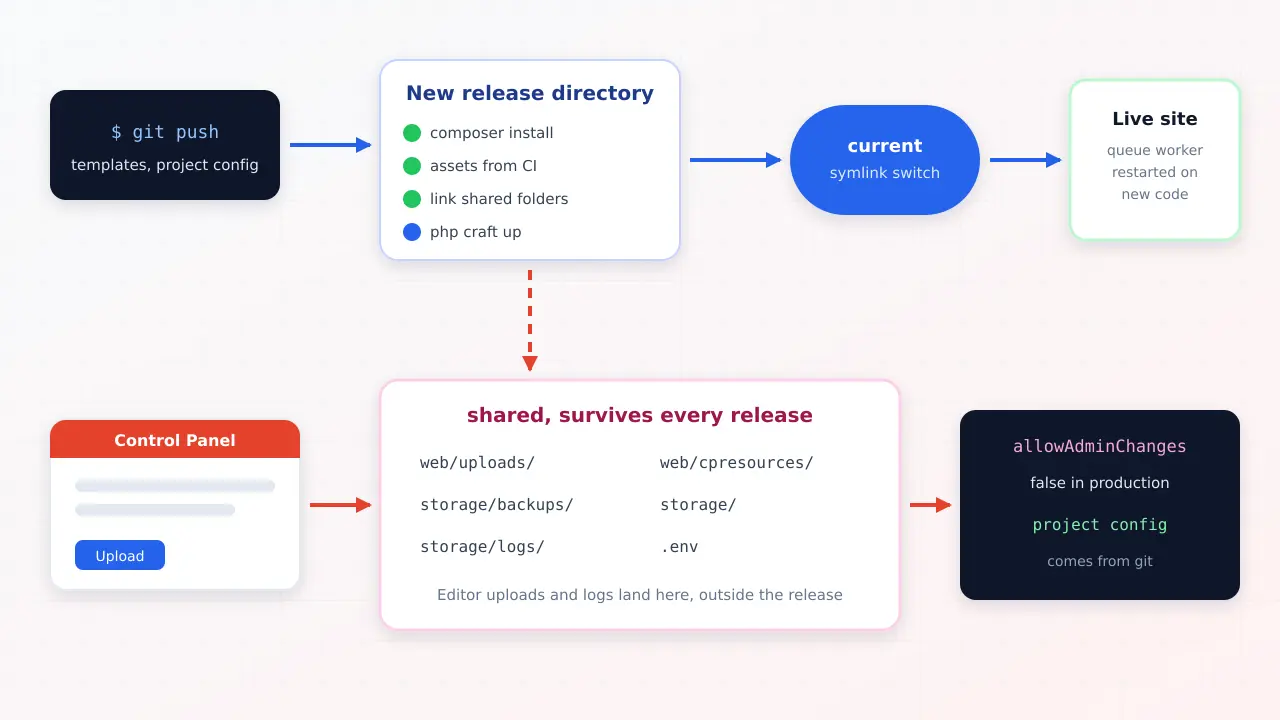
Craft CMS deployment on your own server means three things done in the right order: build the new code in a fresh release directory, link the files that must persist (the .env, storage/, web/cpresources/ and any local asset volume such as web/uploads), then run php craft up to apply project config and migrations before switching the live symlink. Craft's own docs recommend exactly this atomic pattern. DeployManage runs it on every git push on Growth and Business, on servers in your own DigitalOcean, Hetzner, AWS, Vultr or Linode account, so an agency can host ten Craft sites on two servers for less than one Craft Cloud project costs.
A Craft site changes from two directions. Developers push templates, plugins and project config YAML through git, and editors upload images and files in the Control Panel straight onto the server. A deploy that copies a fresh checkout over the site, or rebuilds it from scratch, can quietly delete those uploads or leave the database out of step with the config.
The other classic failure is a production Control Panel that still allows admin changes. Someone adds a field on the live site, the next deploy applies the project config from git, and the field is gone. Craft's documentation says allowAdminChanges should be off everywhere except development, and the deploy process below assumes it is.
Pick DigitalOcean, Hetzner, AWS, Vultr, Linode or your own VPS. DeployManage installs Nginx, PHP-FPM with the extensions Craft 5 lists (BCMath, Intl, GD, Zip and the rest), MySQL 8, MariaDB or PostgreSQL 16, Composer, Redis and Supervisor, and closes every port except 22, 80 and 443.
On zero downtime sites the .env file and storage/ are shared between releases automatically. The deploy script is yours to edit, so linking web/cpresources and a local volume such as web/uploads from the shared directory is two lines.
Each push runs composer install and php craft up --interactive=0 inside a new release directory, then flips the current symlink in one step. If a migration fails, the live site never sees the new code. Available on Growth and Business.
By default Craft runs queue jobs from visitor page requests. Add php craft queue/listen as a Supervisor daemon, or a one minute cron running queue/run, and image transforms, search indexing and emails run in the background without slowing anyone down.
Let's Encrypt certificates are issued and renewed per domain, the firewall is set when the server is built, and scheduled commands such as gc or a nightly backup run from the panel's cron editor.
Growth includes 10 team members and Business is unlimited. Every deploy, rollback and SSH key change is recorded with the person who made it, across every client server.
Paste an API token from DigitalOcean or Hetzner and DeployManage creates the server for you, or run one install command on an AWS, Vultr, Linode or other VPS. The servers stay in your account and on your provider's invoice.
Choose a region close to the client's visitors, for example a 4 GB droplet in New York, add the domain and create the MySQL database. A Let's Encrypt certificate is issued and renewed for you.
Pick the GitHub, GitLab or Bitbucket repository and branch, paste the production .env once with CRAFT_ENVIRONMENT=production and allowAdminChanges off, and add the shared links for web/cpresources and your asset volume to the deploy script.
On Growth and Business every push becomes an atomic release that installs dependencies and runs craft up before going live. Editors keep working in the Control Panel the whole time.
Prices from each vendor's own pricing page, read in October 2026. The honest headline: Laravel Forge is the cheaper panel for Craft on a VPS, and Craft Cloud removes the server entirely and includes the Craft licence. DeployManage is the choice for teams that want the same atomic release on several servers, team seats and an audit log, on one plan.
swipe to see all columns →
| What you are comparing | DeployManage | Laravel Forge | Craft Cloud | Servd |
|---|---|---|---|---|
| Monthly price | Starter $59, Growth $129, Business $299, servers billed by your cloud | Hobby $12, Growth $19, Business $39, servers billed by your cloud | Team $120 or Pro $240 per project ($110 or $220 paid yearly) | Starter, Enhanced and Pro, each plan covers one Craft install |
| Craft licence | Bought separately: Team $279 or Pro $399, then $99 a year | Bought separately | Included in the plan | Bought separately |
| Sites covered | 10 per server on Starter, 50 on Growth, unlimited on Business | Unlimited sites | One project, 2 environments on Team and 3 on Pro | One Craft install per plan |
| Zero downtime deploys | Yes on Growth and Business, with shared folders you control | Yes on new sites, one server per site | Built in, images rebuilt on each deploy | Atomic code deployments |
| Same release to several servers | Yes on Growth and Business | Needs Envoyer at $10 to $50 more | Platform scales it | Load balanced redundancy |
| SSH and root access | Yes, your server | Yes, your server | No, serverless with an ephemeral filesystem | No server access |
| Where it runs | Your DigitalOcean, Hetzner, AWS, Vultr, Linode or own VPS | Laravel VPS or your cloud account | Oregon, Quebec, Frankfurt or Sydney | US, EU, UK and CA regions |
Eight or fifteen marketing sites, each with its own Craft Team or Pro licence, spread over two or three servers. Clients upload images every day and developers push template changes every week, and neither should be able to break the other.
Teams leaving shared hosting, FTP uploads or a git pull deploy that has already overwritten an uploads folder once. Atomic releases plus shared folders end that class of incident.
A store that cannot go down during a deploy and needs queue jobs for order emails and stock updates to run reliably. A Supervisor queue runner and craft up before the symlink switch keep checkout working through every release.
Craft for the marketing site and a Laravel app for the product, on the same server or the same fleet. One panel, one deploy process and one set of SSH keys for both.
Deploy Craft CMS by building each release in its own directory, linking the files that must persist, running php craft up and then switching a symlink. Craft's deployment guide describes this atomic pattern and lists what must survive a deploy: the .env file, storage (including storage/backups), uploaded assets such as web/uploads, and the project config in config/project, which lives in git.
On a DeployManage zero downtime site the order is fixed. The panel clones the commit into releases/<timestamp>, links the shared .env and storage/, then runs your deploy script. Front end assets are usually built in CI or committed, so a typical script looks like this:
mkdir -p "$DM_SITE_DIR/shared/cpresources" "$DM_SITE_DIR/shared/uploads"
ln -sfn "$DM_SITE_DIR/shared/cpresources" web/cpresources
ln -sfn "$DM_SITE_DIR/shared/uploads" web/uploads
composer install --no-dev --no-interaction --optimize-autoloader
php craft up --interactive=0
php craft clear-caches/dataOnly when every line succeeds does the current symlink move to the new release. Craft takes a database backup before it applies pending migrations, so a failed migration leaves both the old code and a fresh backup in place. The last five releases stay on disk for a rollback.
Share the .env file, storage/, web/cpresources/ and every local asset volume. storage/ holds runtime files, logs, backups and rebrand images. web/cpresources/ holds the compiled Control Panel resources Craft publishes on first request, and sharing it avoids a burst of slow Control Panel loads after each deploy. Local volumes such as web/uploads hold everything editors upload.
Do not share config/project. Project config is meant to come from git, and craft up applies it to the database on each deploy. If a client asks to add fields on the live site, the answer is a staging environment, not allowAdminChanges in production.
If your assets already live on S3, DigitalOcean Spaces or another remote volume, there is no uploads folder to share, which also makes it possible to run one Craft site on two servers behind a load balancer.
Craft's default queue runner piggybacks on page requests: at the end of a request it injects a small script that starts a background process. That works on a quiet site and is unreliable on a busy one, because jobs wait for visitors and compete with them for PHP workers.
On your own server you have two better options. Set runQueueAutomatically to false and add php craft queue/listen --verbose as a Supervisor daemon in the panel, remembering that a daemon keeps the old code in memory and needs a restart after a release, which Craft's own docs point out. Or add a one minute cron that runs php craft queue/run from the current directory, which exits when the queue is empty and always starts on the newest release. For most marketing sites the cron is simpler; Commerce stores with heavy email or stock jobs are better on the daemon.
Craft 5 needs PHP 8.2 or later, MySQL 8.0.17 or later with InnoDB, MariaDB 10.4.6 or later, or PostgreSQL 13 or later, at least 256 MB of PHP memory (512 MB recommended) and 200 MB of free disk. It also needs sixteen PHP extensions, including BCMath, Intl, GD, Zip and DOM, and Craft recommends ImageMagick for better image transforms.
Every server DeployManage builds meets those requirements out of the box. In practice a single 2 GB server handles two or three small Craft sites with MySQL on the same box, and a 4 GB server handles five or six. Image transforms are the usual memory spike, so give a site with large photo libraries more headroom or move transforms to a remote volume.
The Craft licence is the same wherever you host, except on Craft Cloud, which includes it. Craft Solo is free with one account; Team is $279 per project and Pro is $399 per project, each with a year of updates and $99 a year after that. Budget that line separately for every client site.
Hosting and panel cost, per month, with DigitalOcean Basic Droplets in a US region ($12 for 2 GB, $24 for 4 GB, $48 for 8 GB):
| Setup | Craft Cloud | Forge on DigitalOcean | DeployManage on DigitalOcean |
|---|---|---|---|
| One Craft Team site, 2 GB server | $120 | $24 (Hobby $12 + $12) | $71 on Starter (no atomic releases), $141 on Growth |
| Ten client sites, two 4 GB servers | $1,200 (ten projects) | $67 (Growth $19 + $48) | $177 (Growth $129 + $48) |
| One busy site released to two 4 GB servers | $240 on Pro | $77 (Growth $19 + Envoyer $10 + $48) | $177 (Growth $129 + $48) |
Forge is cheaper than DeployManage in every row, and the table says so on purpose. The reason teams pick DeployManage anyway is the combination in one plan: atomic releases across several servers without a second subscription, 10 seats on Growth, and an audit log of every deploy across every client server. If you are one developer with one Craft site, Forge Hobby on a $12 server is the better buy. For a full breakdown of Craft Cloud's plans see Craft Cloud pricing.
Launch the new server, add the site and connect the repository, then copy the uploads folder into the shared directory with rsync and import a database backup with php craft db/restore. Run a first deploy on a temporary hostname and check the Control Panel, an image transform and a form submission. Lower the DNS TTL a day ahead and switch DNS last. If the old host was Craft Cloud or Servd, move assets off their asset platform first, because the paths change with the volume.
Ready to stop managing servers by hand? DeployManage provisions, deploys and monitors your fleet from one dashboard.
Get startedUse atomic deployments: build each release in a new directory, link the .env, storage, web/cpresources and local uploads from a shared folder, run php craft up, then switch a symlink. Craft's own deployment guide recommends this pattern because it keeps the live site untouched until the new release is ready.
Yes. Craft is a self hosted PHP application that runs on any server with PHP 8.2 or later, MySQL 8.0.17 or later or PostgreSQL 13 or later, and the standard extensions. A 2 GB VPS runs two or three small Craft sites comfortably, and a panel handles Nginx, SSL, the queue runner and deploys.
php craft up applies pending project config changes from config/project and runs any pending database migrations for Craft and its plugins. Run it with --interactive=0 in a deploy script, after composer install and before the release goes live. Craft takes a database backup before it applies migrations.
No. Craft's documentation says allowAdminChanges should be disabled in all but development environments. If admins change fields or sections on the live site, the next deploy applies the project config from git and overwrites those changes. Make schema changes locally or on staging and deploy them through git.
On your own server, a Craft site costs the server (about $12 to $24 a month on DigitalOcean) plus a panel fee, plus the Craft licence: Team $279 or Pro $399 per project, then $99 a year. Craft Cloud costs $120 or $240 per project per month with the licence included.
Yes. Forge deploys any PHP app from git, and its zero downtime deployments support shared paths, so you can share storage, web/cpresources and uploads. Forge's native zero downtime deploys cover one server per site, so a Craft site on several servers needs Envoyer or another panel.
Set runQueueAutomatically to false, then either run php craft queue/listen as a Supervisor daemon and restart it after each release, or add a one minute cron that runs php craft queue/run. The cron always starts on the newest code, while the daemon picks up jobs instantly.
Connect a cloud account, launch a server and push your first Craft release with shared uploads and craft up. Every account starts with a one-time demo, no card required.