DeployManage, server management for any cloud

Deploy Symfony to Production and Symfony Hosting on Your Own Servers With Zero Downtime

Connect a cloud account, launch a PHP 8.1 to 8.4 server with Nginx, MySQL or PostgreSQL, Redis and Supervisor, and ship every Symfony app from git as an atomic release. Composer, migrations and cache warmup run in the new release, and traffic only moves when every step has passed.

One-time demo, no credit card required.

Symfony, Upsun, Laravel Forge, Laravel Cloud and DigitalOcean figures read from their own docs and pricing pages in October 2026.

Servers 5 online
New server
Servers
Sites
Deployments
Databases
Mailboxes
Recipes
Activity
Server Provider Load
web-01.prod
fsn1
Hetzner
32%
web-02.prod
fsn1
Hetzner
47%
db-01.prod
fra1
DigitalOcean
18%
worker-01
eu-central-1
AWS
61%
mail-01
gra
OVHcloud
9%
Deploy to web-01.prod Live
  • Pull main from GitHub
  • Build and migrate
  • Switch release, zero downtime
Finished in 11.3 s
The short answer

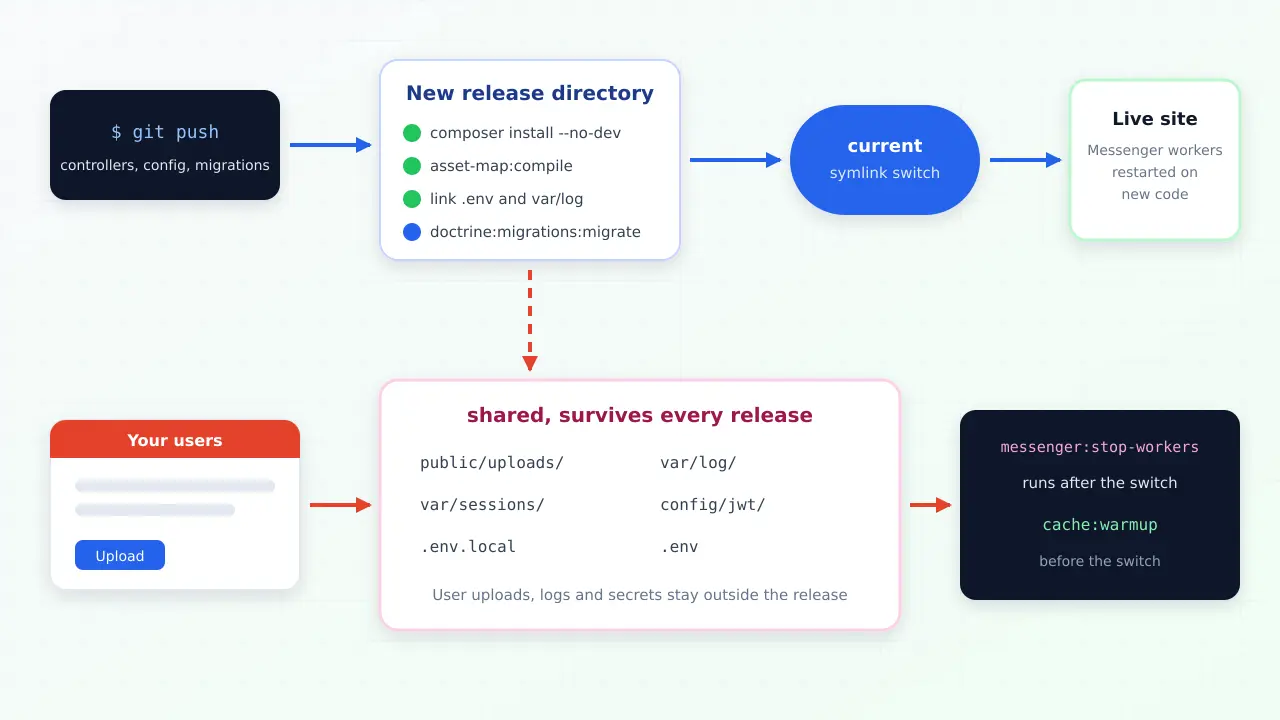
To deploy Symfony to production without downtime, build each release in a fresh directory, run composer install --no-dev --optimize-autoloader, warm the prod cache and run Doctrine migrations there, link the files that must persist (.env, var/log, uploads), then switch a symlink and run messenger:stop-workers so Supervisor restarts the workers on the new code. DeployManage runs that sequence on servers in your own DigitalOcean, Hetzner, AWS, Vultr or Linode account, keeps the last five releases on disk, and gives a team seats and an audit log. For one developer with one app, Laravel Forge at $12 a month is cheaper; for many client apps, DeployManage costs far less than a per project platform.

Diagram of a git push building a new Symfony release with composer, asset compilation and migrations while uploads, logs and env files stay in shared folders outside the release

Where Symfony deploys usually break

Most broken Symfony deploys come from doing the right steps in the wrong place. Running composer install or cache:clear inside the live directory means real requests hit a half updated vendor folder or an empty cache for several seconds, and on a busy app that shows up as 500 errors and a spike of slow pages right after every push.

The second classic failure is the worker. A Messenger consumer started before the deploy keeps running the old code until it exits, so a changed message handler can process jobs with yesterday's logic for hours. Symfony's own docs say to restart workers on each deploy with messenger:stop-workers, and the sequence below does exactly that, after the switch.

What DeployManage does for a Symfony app

A PHP server ready for Symfony 6.4, 7.4 and 8

Pick DigitalOcean or Hetzner and the server is created through their API, or run one install command on AWS, Vultr, Linode or any Ubuntu VPS. You get Nginx, PHP-FPM 8.1 to 8.4, MySQL 8, MariaDB or PostgreSQL 16, Composer, Redis and Supervisor, with every port closed except 22, 80 and 443.

Atomic releases from git

Every push to your branch clones the commit into a new releases directory, links the shared .env, runs your deploy script inside the release and only then moves the current symlink. Nginx serves public/ from current, so a failed composer or migration step never touches the live app.

Your deploy script, in plain bash

Write the Symfony steps you already trust: composer install, dump-env, asset-map:compile or an Encore build, cache:warmup, doctrine:migrations:migrate. The script runs as the deploy user with DM_SITE_DIR and DM_RELEASE_DIR set, so linking shared folders is one line.

Messenger workers under Supervisor

Add messenger:consume async --time-limit=3600 as a daemon with the number of processes you need. Supervisor keeps it alive, and messenger:stop-workers in your post deploy step makes every worker restart on the new release.

Scheduled commands

Run bin/console scheduler commands or any cron entry per site from the panel, with the same environment as the web app. No crontab edits over SSH, and every change is logged.

The last five releases kept on disk

Old releases are not deleted on deploy. A git revert and push builds a clean release, and because the previous release is still on the server, pointing current back at it is a one line fix while you prepare the proper patch.

Free SSL and a firewall

Let's Encrypt certificates are issued and renewed for each domain, and the firewall rules are part of the server record, so a client audit can see exactly what is open.

GitHub, GitLab and Bitbucket repositories

Point a site at a repository on any of the three hosts. Public repositories clone over HTTPS, private ones over SSH with the server key added to your repository, so no personal token ever sits on the server.

Seats and an audit log

Growth includes 10 team members and Business is unlimited. Every deploy, environment change and SSH key is recorded with who did it, which matters when an agency runs servers for paying clients.

How it works

  1. 1
    Connect a cloud account

    Paste a DigitalOcean or Hetzner API token and DeployManage creates the server, or run the install command on an AWS, Vultr, Linode or other VPS. Servers stay in your account and on your provider's invoice.

  2. 2
    Add the Symfony site

    Point it at your GitHub, GitLab or Bitbucket repository and branch, set the web directory to /public, choose the PHP version and paste your production environment variables into the shared .env.

  3. 3
    Write the deploy script once

    Replace the default Laravel lines with Symfony commands: composer install, cache:warmup, migrations, assets and the shared folder links. Turn on zero downtime releases and quick deploy on push.

  4. 4
    Push and watch the release go live

    Each push builds a new release, runs your script and switches traffic only on success. Add the Messenger daemon and the scheduler cron, and the app is in production.

Symfony hosting and deployment options compared

Prices from each vendor's own pricing page, read in October 2026, in USD. The honest headline: Laravel Forge is the cheapest panel for one Symfony app on a VPS, and Upsun and Laravel Cloud remove the server entirely. DeployManage is for teams that want atomic releases across several servers and client apps, with seats and an audit log, on one flat plan.

swipe to see all columns →

What you are comparing DeployManage Laravel Forge Upsun Flex Laravel Cloud
How you pay Starter $59, Growth $129, Business $299 a month, servers billed by your cloud Hobby $12, Growth $19, Business $39 a month, servers billed by your cloud $9 per project, $10 per user, plus CPU, memory and disk by the hour, plus a support tier from 10% Starter $5, Growth $20, Business $200 a month plus usage
Where the app runs Your own servers on DigitalOcean, Hetzner, AWS, Vultr, Linode or any Ubuntu VPS Your own servers Upsun containers Laravel Cloud on AWS
Zero downtime deploys Yes on Growth and Business, symlink releases Yes on new sites, one server per site Rolling strategy in open beta, applications only, opt in per deploy Yes, every push
Same release to several servers Yes on Growth and Business Needs Envoyer at $10 to $50 more Platform scales containers Platform scales
Messenger workers Supervisor daemons you define Daemons on the server Worker containers priced like app containers Managed processes or managed queues
SSH and local disk Full root SSH, persistent disk Full SSH Read only app filesystem except declared mounts No server access
Team seats 2 on Starter, 10 on Growth, unlimited on Business Varies by plan $10 per user a month Unlimited users
Preview environments Run a staging server or site Staging sites by hand Yes, each preview billed for its resources Yes, per pull request

Who it's for

An agency running client Symfony apps

Six to fifteen client projects, some on Symfony 6.4 LTS, newer ones on 7.4, spread over two or three servers. Each client has its own database and workers, and the agency needs every developer to deploy without sharing a root password.

A SaaS team leaving a per project platform

The product grew from one app to an API, an admin and two worker pools, and the platform bill grew with every user licence and preview environment. Moving to two or three servers the team owns cuts that bill while keeping push to deploy.

A company that must stay on AWS or its own cloud

Security review, an AWS contract or credits mean the app has to run in the company's own account. DeployManage provisions nothing outside it and keeps the servers, data and invoices where the auditors expect them.

API Platform and Messenger heavy apps

Apps that do most of their work in queues need long running consumers, Redis and predictable memory. Plain servers with Supervisor give those workers steady capacity without per container pricing.

How do you deploy a Symfony app to production?

Deploy a Symfony app by installing vendors without dev packages, setting real production environment variables, warming the prod cache and running migrations, all inside a new release directory, then switching traffic to it. Symfony's deployment guide lists the same core tasks: check requirements, configure environment variables (optionally compiled with composer dump-env prod), run composer install --no-dev --optimize-autoloader, clear the prod cache, then the extras such as migrations, asset compilation and restarting workers.

On a DeployManage zero downtime site the panel clones the commit into releases/<timestamp>, links the shared .env, sets DM_SITE_DIR and DM_RELEASE_DIR, and runs your script inside the release. A typical Symfony script with AssetMapper looks like this:

composer install --no-dev --no-interaction --prefer-dist --optimize-autoloader
composer dump-env prod
mkdir -p "$DM_SITE_DIR/shared/log" "$DM_SITE_DIR/shared/uploads"
rm -rf var/log && ln -sfn "$DM_SITE_DIR/shared/log" var/log
ln -sfn "$DM_SITE_DIR/shared/uploads" public/uploads
php bin/console asset-map:compile
php bin/console cache:warmup --env=prod
php bin/console doctrine:migrations:migrate --no-interaction --allow-no-migration

If you build assets with Webpack Encore, swap the asset-map line for npm ci and npm run build, or build them in CI and commit the output (Node is not part of the default server stack). Only when every line exits cleanly does the current symlink move. The previous release keeps serving until that moment, and the last five releases stay on disk.

If your team also ships Laravel or WordPress sites, the same flow covers them from one panel; the PHP deployment tool comparison shows the price and scope against Deployer and Envoyer.

Which Symfony folders must be shared between releases?

Share anything written at runtime that must outlive a deploy: the production .env, var/log, user uploads such as public/uploads, file based sessions if you use them, and generated keys such as config/jwt. The var/cache directory is the exception. It belongs to each release, because the cache is compiled for that exact code, and warming it inside the new release is what makes the switch instant.

DeployManage links the shared .env automatically and keeps the environment editor as the single source of truth for secrets. Every other shared path is one ln -sfn line in your script, pointing at a folder under $DM_SITE_DIR, so you decide exactly what persists. Store anything larger, like customer documents, in S3 compatible object storage through Flysystem instead of local disk if more than one server serves the app.

Running Symfony Messenger workers in production

Run Messenger consumers under Supervisor with a time or memory limit, and call messenger:stop-workers after every deploy so they restart on the new code. Symfony's Messenger docs recommend exactly this: a process manager keeps the worker alive, flags such as --time-limit=3600 or --memory-limit=128M stop leaks from piling up, and stop-workers signals each consumer to finish its current message and exit.

In DeployManage you add the worker as a daemon, for example php bin/console messenger:consume async --time-limit=3600, with as many processes as the queue needs. The daemon runs from the current symlink, so after the switch a restart picks up the new release automatically. Failed messages stay in your failure transport, where messenger:failed:retry works as usual.

Symfony hosting requirements for a VPS

Symfony 8.1 needs PHP 8.4 or higher, Symfony 7.4 LTS needs PHP 8.2 and Symfony 6.4 needs PHP 8.1, according to symfony.com/releases. All three run on a DeployManage server, which offers PHP 8.1, 8.2, 8.3 and 8.4 per site, so a 6.4 client app and a new 8.1 project can share one machine.

For sizing, a typical Symfony app with Doctrine, a Redis cache and two Messenger workers runs comfortably on a 4 GB, 2 vCPU server such as the DigitalOcean $24 Droplet or a Hetzner CX33. Several client apps fit on an 8 GB server at $48 on DigitalOcean. Keep OPcache on, set APP_ENV=prod and APP_DEBUG=0, and point Nginx at public/ with the standard front controller rule, which the panel writes for you.

Symfony hosting cost on your own servers

Three common setups, priced in USD with DigitalOcean Basic Droplets ($12 for 2 GB, $24 for 4 GB, $48 for 8 GB). Upsun figures use its own calculator rates: $25 per app vCPU and $10 per GB of app memory a month, $37 and $15 for service containers such as MySQL, $0.50 per GB of disk, $9 per project, $10 per user and the Standard support tier at 10% on top.

SetupLaravel ForgeDeployManageUpsun Flex
One app and MySQL, one developer, production only$36 (Hobby $12 + 4 GB $24)$83 on Starter without zero downtime, $153 on Growthabout $93 (0.5 vCPU app, 0.5 vCPU MySQL)
App, worker, Redis and MySQL, 5 developers, staging$79 (Growth $19 + 8 GB and 2 GB servers $60)$189 (Growth $129 + $60)about $343 with 2 preview environments and 200 GB egress
Agency, 8 client apps with MySQL, 4 developers$115 (Growth $19 + two 8 GB servers $96)$225 (Growth $129 + $96)about $697 (8 projects)

Forge is cheaper than DeployManage in every row, and for a single developer with one app it is the right buy. DeployManage pays off when a team needs the same release on several servers without adding Envoyer, ten seats with an audit log, and one plan across many client apps. Against per project platforms, owning the servers saves several hundred dollars a month from the second or third project onward. Upsun new accounts also get a first project credit of $19 a month, which covers one project fee and one user.

Moving a Symfony app from Upsun, Heroku or shared hosting

Move the database first, then the code, then the DNS. Dump the production database (pg_dump or mysqldump), restore it on the new server, copy uploaded files from the old mounts or object storage, and paste the environment variables into the shared .env. Translate the old platform's build and deploy hooks into the deploy script above, and its workers into daemons.

Deploy once to the new server and test it through a hosts file entry or a temporary subdomain. When it works, lower the DNS TTL, put the old app in maintenance mode, take a final database dump, restore it, and switch the DNS. Most Symfony apps move in an afternoon this way, and the old platform can stay up as a fallback until the TTL has expired everywhere.

Ready to stop managing servers by hand? DeployManage provisions, deploys and monitors your fleet from one dashboard.

Get started
Frequently asked questions

How do I deploy a Symfony application to production?

Install vendors with composer install --no-dev --optimize-autoloader, set production environment variables or run composer dump-env prod, warm the prod cache, run Doctrine migrations and compile assets. Do it in a new release directory and switch a symlink at the end, so visitors never see a half deployed app. Restart Messenger workers after the switch.

What is the best way to deploy Symfony?

Atomic releases: build each deploy in its own directory, link shared files such as .env and var/log, run every build step there and switch traffic with a symlink only when they all succeed. Deployer, DeployManage and platforms such as Upsun all follow this idea. On your own servers the previous release also stays on disk if you need to go back.

Can I deploy Symfony with zero downtime?

Yes. Zero downtime comes from preparing the full release, vendors, cache and assets, before any traffic reaches it, then switching a symlink, which is atomic on Linux. Run backward compatible migrations so the old and new code both work during the short overlap. DeployManage does this on Growth and Business plans.

Where should I host a Symfony app?

One developer with one app gets the most for the money on a $12 to $24 VPS with Laravel Forge. A team that wants no servers can use Upsun or Laravel Cloud. An agency or SaaS team running several apps across servers, with seats and an audit log, fits a panel like DeployManage on its own cloud account.

Does Symfony need a dedicated server?

No. A Symfony app with Doctrine, Redis and a couple of Messenger workers runs well on a 4 GB, 2 vCPU cloud server that costs about $24 a month on DigitalOcean. Several small client apps can share an 8 GB server, each with its own PHP version, database and workers.

How much does Symfony hosting cost?

On your own server, from about $36 a month with Forge and a 4 GB Droplet, or $83 to $153 with DeployManage depending on whether you need zero downtime releases. Upsun Flex for a small app with MySQL and one user comes to roughly $93 a month at its calculator rates, and it grows with every project, user and preview environment.

Can Laravel Forge deploy Symfony?

Yes. Forge deploys any PHP application from git, and you replace the Laravel commands in its deploy script with Symfony ones. Its native zero downtime deploys work on one server per site, so a Symfony app behind a load balancer needs Envoyer as a second subscription, which is the gap DeployManage covers on one plan.

Related

Upsun pricing Laravel Forge alternative Laravel Envoyer alternative Deploy from git Laravel DigitalOcean hosting Hetzner control panel Laravel Cloud alternative Craft CMS deployment Drupal deployment PHP deployment tool Platform.sh alternative

Deploy your Symfony apps to servers you own.

Connect a cloud account, launch a server and push your first Symfony release with migrations, cache warmup and Messenger workers. Every account starts with a one-time demo, no card required.

Get started Pricing

One-time demo, no credit card required.