DeployManage, server management for any cloud

Statamic Hosting and Statamic Deployment With Static Caching on Your Own Servers

Connect your cloud account, launch a PHP server with Nginx, Redis and Supervisor, and deploy every Statamic site from git as an atomic release. Content, users and assets your editors save in the Control Panel live outside the release, so a deploy never overwrites them.

One-time demo, no credit card required.

Statamic, Laravel Forge, Ploi and DigitalOcean figures read from their own pricing pages and docs in October 2026.

Servers 5 online
New server
Servers
Sites
Deployments
Databases
Mailboxes
Recipes
Activity
Server Provider Load
web-01.prod
fsn1
Hetzner
32%
web-02.prod
fsn1
Hetzner
47%
db-01.prod
fra1
DigitalOcean
18%
worker-01
eu-central-1
AWS
61%
mail-01
gra
OVHcloud
9%
Deploy to web-01.prod Live
  • Pull main from GitHub
  • Build and migrate
  • Switch release, zero downtime
Finished in 11.3 s
The short answer

Statamic runs on any server that runs Laravel, so Statamic hosting comes down to two choices: a managed platform such as fortrabbit or Ploi Cloud, or your own VPS with a panel on top. The VPS route is cheaper per site once you host several client sites, but it has one Statamic specific trap. Flat file content saved in the Control Panel is written inside the code directory, which is why Laravel Forge keeps zero downtime deploys switched off for Statamic sites by default. DeployManage keeps content/, users/, public/assets and the static cache in shared folders, links them into every release, and warms the Stache and the static cache before the switch. It costs more than Forge or Ploi, starting at $59 a month.

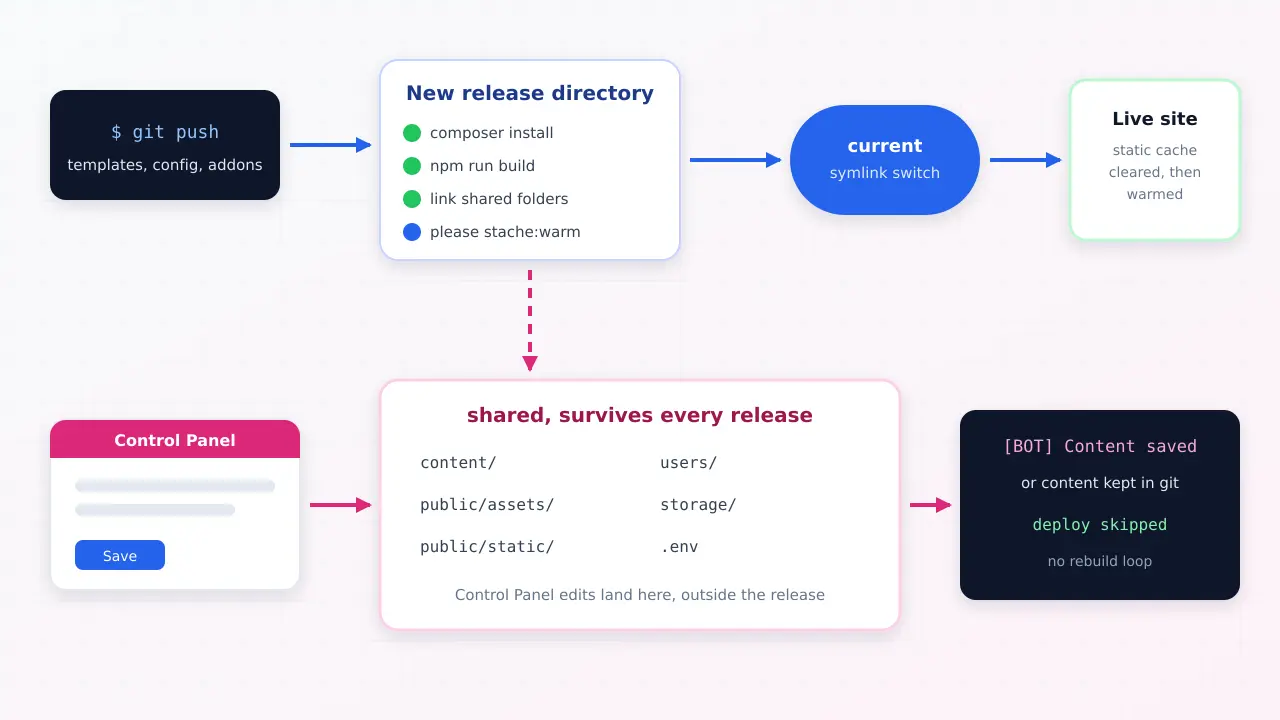
Diagram of a git push building a new Statamic release while Control Panel edits are saved to shared content folders outside the release

Where Statamic deploys usually go wrong

A Statamic site has two sources of change. Developers push templates, blueprints and addons through git, and editors save entries in the Control Panel straight to Markdown and YAML files on the server. A plain git pull deploy handles the first and quietly fights the second.

Atomic releases make it worse if nobody plans for it: each release is a fresh copy of the repository, so an entry saved an hour ago in the old release is simply not there in the new one. The fix is to decide where content lives before the first deploy, and that is what the setup below does.

What DeployManage does for a Statamic site

A PHP server built for Statamic

Pick DigitalOcean, Hetzner, AWS, Vultr, Linode or your own VPS. DeployManage installs Nginx, PHP-FPM, Composer, Redis and Supervisor and closes every port except 22, 80 and 443. Glide image transforms use the GD or Imagick PHP extension, which you can add with a recipe.

Content that survives every deploy

The deploy script is yours to edit per site. Link content/, users/, public/assets, storage and public/static from a shared directory into each release, and Control Panel edits stay put while the code underneath them changes.

Atomic releases with rollback

Each push runs composer install and your asset build in a fresh release directory, warms the Stache, then flips the current symlink in one step. If something breaks, the previous release is still on disk. Available on Growth and Business.

Full static caching in Nginx

Statamic's full measure cache writes HTML files to public/static, and Nginx serves them before PHP starts. Add the try_files rule once, then clear and warm the static cache in the deploy script so visitors never see a page built from the old templates.

Queue workers for Git automation

Statamic's Git automation commits on the sync queue by default. Point it at Redis and a Supervisor worker instead, and saves in the Control Panel return instantly while the commit and push happen in the background.

Seats and an audit log for agencies

Growth includes 10 team members and Business is unlimited. Every deploy, rollback and SSH key change is recorded with the person who made it, across every client server.

How it works

  1. 1
    Connect a cloud account

    Paste an API token from DigitalOcean, Hetzner, AWS, Vultr or Linode, or add an existing server over SSH. The servers stay in your account and on your provider's invoice.

  2. 2
    Launch a server and add the site

    Choose a region close to the client's visitors, for example a 2 GB droplet in New York, and add the domain. A Let's Encrypt certificate is issued and renewed for you.

  3. 3
    Connect the repository and set shared folders

    Pick the GitHub, GitLab or Bitbucket repository and branch, paste the .env once, and add the shared folder links for content, users and assets to the deploy script.

  4. 4
    Push to deploy

    On Growth and Business every push becomes an atomic release that warms the Stache and the static cache before going live. Editors keep working in the Control Panel the whole time.

Statamic hosting options compared

Software and platform prices from each vendor's own pricing page, read in October 2026. The honest headline: Forge and Ploi are cheaper panels, and managed platforms remove the server entirely. DeployManage is the option for teams that want atomic releases with shared Statamic content across several servers, plus seats and an audit log, on one plan.

swipe to see all columns →

What you are comparing DeployManage Laravel Forge Ploi Managed Statamic platform
Monthly software fee Starter $59, Growth $129, Business $299 Hobby $12, Growth $19, Business $39 Basic $10, Pro $16, Unlimited $36 fortrabbit or Ploi Cloud, priced by resources
Servers covered 3 on Starter, 10 on Growth, unlimited on Business 1 external server on Hobby, unlimited on Growth and Business 5 on Basic, 10 on Pro, unlimited on Unlimited No server to manage
Zero downtime deploys for Statamic Yes on Growth and Business, with shared content folders Yes, but disabled by default for Statamic sites, one server per site Yes on Pro and Unlimited, not on Basic Platform handles releases
Statamic specific buttons No, you run please commands in the deploy script or over SSH Statamic deploy script template Statamic 1-click install and Stache warming in the web UI Varies by platform
Same release to several servers Yes on Growth and Business No, needs Envoyer at $10 to $50 more Synchronized deploys of linked sites Platform scaling
Team seats 2 on Starter, 10 on Growth, unlimited on Business Share servers with teammates on every plan Server sharing on Unlimited only Per platform
Where the servers run Your DigitalOcean, Hetzner, AWS, Vultr, Linode or own VPS Laravel VPS or your cloud account Your cloud account The platform's own cloud; Ploi Cloud lists Amsterdam, London and Chicago

Who it's for

An agency hosting client Statamic sites

Ten or twenty marketing sites, each on a Statamic Pro licence, spread over a few servers. Clients edit in the Control Panel every day, developers push template changes every week, and neither should be able to break the other.

A high traffic site with full static caching

A content heavy site that serves most pages as static HTML straight from Nginx. The deploy has to clear and rewarm the cache in the right order, or visitors get old templates for hours.

A Statamic site next to a Laravel app

Statamic for the marketing site and a Laravel app for the product, on the same server or the same fleet. One panel, one deploy process and one set of SSH keys for both.

Moving off a managed host to your own cloud

Teams that want the US region of their choice, root access, Glide image processing without platform limits, or a server bill that does not grow with every new client site.

Can Statamic run on a VPS instead of managed hosting?

Yes. Statamic is a Laravel package, so it runs on any server that runs a current Laravel app: PHP 8 with the usual extensions, Composer, and Nginx or Apache. A flat file Statamic site does not even need a database, which is why a single 2 GB server can carry several small client sites comfortably.

The managed platforms are a real option and worth naming. fortrabbit sells Statamic hosting on its managed PHP platform and offers a seven day trial without a card. Our fortrabbit pricing comparison works out where its per app billing stops being the cheaper option. Ploi now runs Ploi Cloud, a container platform priced by memory, with regions in Amsterdam, London and Chicago, and Statamic's own blog has announced it. Both remove server work entirely, which is worth paying for if you host one or two sites.

The case for your own server gets stronger as the site count grows. On a VPS you pay for the server once and add sites to it, you pick the US region, you keep SSH and root, and image transforms, queues and scheduled jobs run without platform limits. What you give up is the setup, and that is the part a panel such as DeployManage on DigitalOcean or on Hetzner does for you.

Why zero downtime deploys need extra setup for Statamic

Statamic's own Laravel Forge guide says it directly: zero downtime deployments are disabled by default for Statamic sites, due to the additional configuration required. The reason is the flat file content model.

An atomic release builds each deploy in a fresh directory and then points the live symlink at it. That is exactly what you want for code. But when an editor saves an entry in the Control Panel, Statamic writes a Markdown or YAML file into content/ inside whichever release is live. The next release is a clean copy of the repository and does not contain that file. The entry looks deleted, and so do new users, uploaded assets and form submissions.

There are two clean ways out, and you should choose one before the first deploy:

DeployManage does not hide either choice behind a Statamic button. The deploy script is plain shell you edit per site, so you can write exactly the shared folder links or git guard your project needs, and it runs the same way on every server behind the site.

Git automation without a deploy loop

Git automation solves content history and creates a new problem. Every save in the Control Panel pushes a commit, a push triggers a deploy, and a deploy on a busy site can run dozens of times a day for nothing but a typo fix.

Statamic's documentation suggests prefixing automated commit messages with [BOT] so the deploy can tell them apart. Put a guard at the top of the deploy script that exits when the latest commit message starts with that prefix, and content commits stop rebuilding the site. A two line guard does it:

git log -1 --pretty=%s | grep -q '^\[BOT\]' && exit 0
# the normal deploy continues below

Two more settings matter on a real site. Git automation commits on the sync queue by default, which makes every save wait for git. Set STATAMIC_GIT_QUEUE_CONNECTION=redis and run a queue worker under Supervisor so saves return immediately; the queue worker and Supervisor setup is the same as for any Laravel app. And STATAMIC_GIT_DISPATCH_DELAY lets several quick edits collapse into one commit instead of ten.

Static caching on your own server

Statamic has two static caching strategies. The half measure keeps rendered pages in Laravel's cache, so every request still boots PHP but skips most of the work. The full measure writes real HTML files to public/static and lets Nginx serve them before PHP starts, which is the fastest option for content sites with heavy traffic.

Full measure needs one Nginx rule, taken from Statamic's static caching docs:

location @static {
    try_files /static${uri}_$args.html $uri $uri/ /index.php?$args;
}

Statamic invalidates a page's cached file when its entry is saved, but a template change in a deploy affects every page at once. The documented order is to run php please static:clear and then php please static:warm during the deploy. With atomic releases, warm the cache before the symlink switch so the first visitor after the deploy already gets fresh HTML. Keep public/static in a shared folder too, or every release starts with an empty cache. For the rest of the server block, see our production Nginx config for Laravel, which Statamic uses as well.

Statamic hosting cost, with real monthly bills

The Statamic licence is the same on every host. Statamic Core is free with one admin account, and Pro, which adds unlimited users, revisions, multi site and Git automation, is $349 per site with one year of updates and $99 a year after that. Client sites are usually Pro, so budget that line separately. The tables below cover hosting only, with DigitalOcean's published prices: a 2 GB droplet at $12, a 4 GB droplet at $24, a load balancer at $12 and a 1 GB managed MySQL database at $15.15.

SetupServersForgePloiDeployManage
One marketing site on a 2 GB droplet$12Hobby $12, total $24Pro $16 for zero downtime, total $28Growth $129, total $141
Agency, 15 client sites on three 4 GB servers plus a 2 GB staging server$84Growth $19, total $103Pro $16, total $100; Unlimited $36 for team sharing, total $120Growth $129, total $213
One busy site on two 4 GB app servers, a load balancer and managed MySQL$75.15Growth $19 plus Envoyer Basic $10, total $104.15Pro $16, total $91.15Growth $129, total $204.15

DeployManage is the most expensive line in every row, and we would rather say so than hide it. Forge with one 2 GB droplet is very hard to beat for a single site. Starter at $59 covers 3 servers but does not include atomic releases, so a Statamic agency that wants zero downtime deploys should price Growth.

The third row is where the choice changes. A Statamic site on two app servers cannot keep flat file content on local disk, because each server would see different entries. You move content to a database with the Eloquent driver or into git, and then you need every server switched to the same release at the same moment. Forge's native zero downtime deploys stop at one server per site, which is why Forge teams add Envoyer for multi server releases. DeployManage Growth does that on one plan and adds 10 seats and the audit log, which is what an agency running many client sites is paying for.

Moving a Statamic site from another host

Because Statamic content is files, a move is mostly a copy. Launch the new server, add the site and connect the repository, then copy content/, users/ and public/assets from the old host into the shared folders with rsync, warm the Stache, and test on a temporary hostname. Switch DNS last, with a short TTL set a day ahead. If the old host is also where the Control Panel lives, freeze edits for the few minutes between the final rsync and the DNS change. Craft sites follow the same pattern with uploads in a local volume instead of content files, and our Craft CMS deployment page has the Craft version of the deploy script. Drupal sites use the same release flow with drush deploy and a shared files folder, covered on our Drupal deployment page.

Agencies doing this across a whole client list usually move a few sites per server per evening and keep the old host for a week as a fallback. The agency hosting page shows how the server count, not the site count, drives the bill on our plans.

Ready to stop managing servers by hand? DeployManage provisions, deploys and monitors your fleet from one dashboard.

Get started
Frequently asked questions

What is the best hosting for Statamic?

For one or two sites, a managed platform such as fortrabbit or Ploi Cloud, or a single VPS with Laravel Forge, is the cheapest sensible choice. For an agency hosting many client sites, your own servers with a panel that handles shared content folders, atomic releases and team seats gives the best cost per site.

Does Statamic need a database?

No. By default Statamic stores content, users and settings as Markdown and YAML files, so a site runs without MySQL. You can move entries and users into a database with the Eloquent driver, which is the usual choice when one site runs on several servers behind a load balancer.

Can you use Laravel Forge with Statamic?

Yes. Statamic publishes a Forge guide with a deploy script that runs composer install, builds assets and warms the Stache. Forge keeps zero downtime deployments disabled by default for Statamic sites because of the extra configuration, and its zero downtime deploys cover one server per site.

Does Statamic support zero downtime deployments?

Yes, once content is kept out of the release directory. Either link content, users and assets from a shared folder into each release, or keep content in git with Git automation and skip deploys for [BOT] commits. Then each release can be built in a fresh directory and switched atomically.

Can Statamic run on shared hosting?

Statamic can run on shared hosting that offers a current PHP version and Composer, and Statamic keeps a public list of hosts known to work. Shared hosting usually lacks queue workers, Redis and Nginx rules for full static caching, so busy or agency sites are better on a VPS.

How much does Statamic cost?

Statamic Core is free with one admin account. Statamic Pro costs $349 per site, including one year of updates, then $99 a year for updates after that, and it is free to use while a site is in development. Enterprise pricing is quoted by Statamic's sales team. Hosting is billed separately.

How do I stop Statamic Git automation from triggering deploys?

Prefix automated commit messages with [BOT], which Statamic's documentation recommends, and add a guard at the top of the deploy script that exits when the latest commit message starts with that prefix. Content commits then stay in git without rebuilding the site.

Related

fortrabbit alternative Deploy Symfony Craft CMS deployment Craft Cloud pricing Laravel Forge alternative Ploi alternative Laravel Envoyer alternative Laravel hosting for agencies Laravel DigitalOcean hosting Hetzner control panel Deploy from git Filament hosting Platform.sh alternative

Host your Statamic sites on servers you own.

Connect a cloud account, launch a server and push your first release with shared content folders. Every account starts with a one-time demo, no card required.

Get started Pricing

One-time demo, no credit card required.