DeployManage, server management for any cloud
Connect your cloud account, launch a PHP 8.3 server with Nginx, Redis, OPcache and Supervisor, and deploy your Filament panel from git. Imports and exports run on real queue workers, and every release is cached and optimized before it goes live.
One-time demo, no credit card required.
Filament requirements read from the Filament 5.x docs; Forge, Ploi, Laravel Cloud and DigitalOcean figures from their own pricing pages, October 2026.
| Server | Provider | Load |
|---|---|---|
|
web-01.prod
fsn1
|
Hetzner |
32%
|
|
web-02.prod
fsn1
|
Hetzner |
47%
|
|
db-01.prod
fra1
|
DigitalOcean |
18%
|
|
worker-01
eu-central-1
|
AWS |
61%
|
|
mail-01
gra
|
OVHcloud |
9%
|
Filament is a normal Laravel app, so any host that runs Laravel 11.28 or newer on PHP 8.2+ can serve it. What separates good Filament hosting from cheap hosting is three things the panel actually uses: a queue worker that keeps running (CSV imports and exports are processed as queued job batches), a cron entry for the scheduler, and a deploy script that runs php artisan filament:optimize so components and icons are cached. Shared hosting rarely gives you all three. A small VPS with a panel does, for roughly $12 to $24 a month in server cost. DeployManage is that panel at $59 to $299 a month; Laravel Forge and Ploi are cheaper, and we say where each one fits below.
Most Filament panels that break in production break for boring reasons. The panel returns 403 for every user because the User model never implemented FilamentUser. An export button spins forever because nothing is consuming the queue. A new resource does not show up because the component cache from the last release is still in place.
None of these are hosting outages, and all of them come from the gap between php artisan serve on a laptop and a real server. The setup on this page closes that gap once, in the deploy script and the server config, so every later push is a non-event.
Pick DigitalOcean, Hetzner, AWS, Vultr, Linode or your own VPS. DeployManage installs Nginx, PHP-FPM with the intl, gd, bcmath and OPcache extensions, Composer, Redis, Supervisor and MySQL, MariaDB or Postgres, then closes every port except 22, 80 and 443.
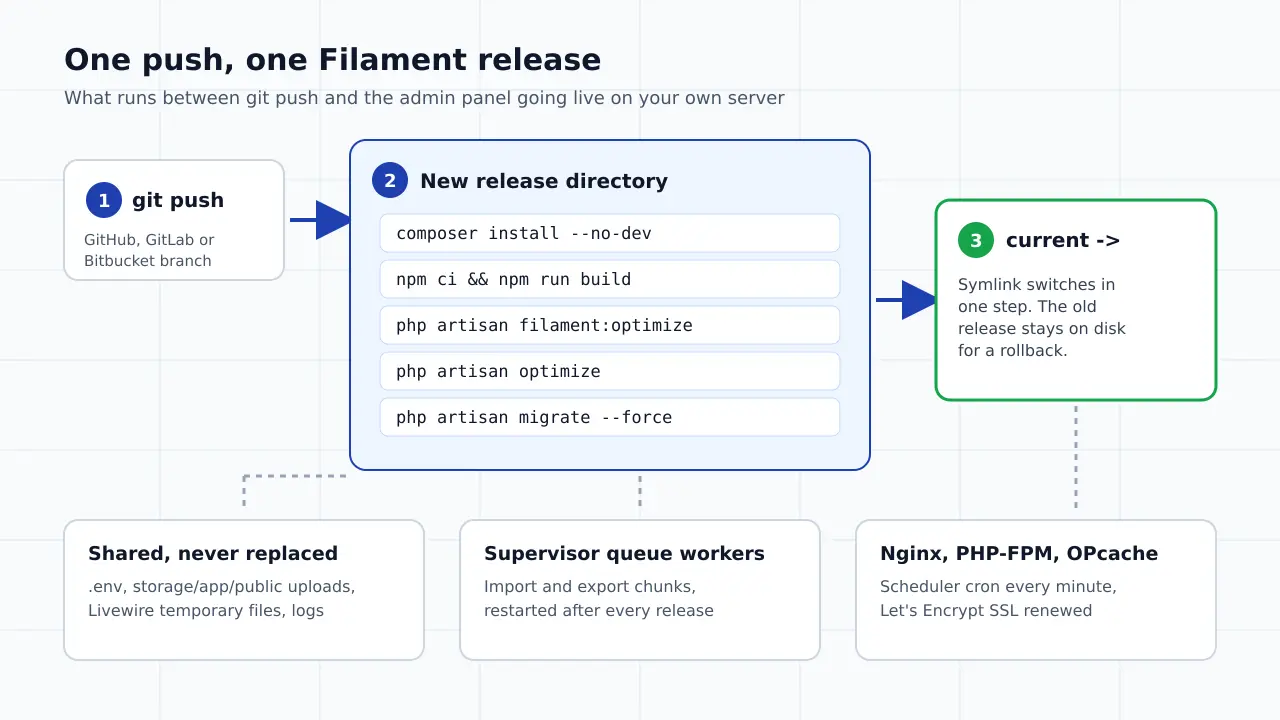
The deploy script is yours to edit per site. Add php artisan filament:optimize next to optimize and migrate --force, and each release ships with Filament components and Blade Icons already cached.
Filament splits a CSV import into chunks and processes each chunk as a queued job in a batch. Add a Supervisor worker on Redis or the database queue and big imports finish in the background while users keep working.
One cron entry runs schedule:run every minute, so scheduled reports, pruning and database notification cleanup keep running without anyone remembering them.
On Growth and Business each push builds a fresh release directory with shared .env and storage, then flips the current symlink in one step. A failed composer install or migration never reaches the live panel.
Growth includes 10 team members and Business is unlimited. Every deploy, rollback and SSH key change is logged with who made it, and the history exports to CSV on every paid plan.
Paste an API token from DigitalOcean or Hetzner, or add any Ubuntu server over SSH. The server stays in your account and on your provider's invoice.
A 2 GB server in a US region is plenty for most internal admin panels. Add the domain, pick PHP 8.3, and a Let's Encrypt certificate is issued and renewed for you.
Pick the GitHub, GitLab or Bitbucket branch, paste the production .env, and add filament:optimize and your asset build to the script. Add a queue worker and the scheduler cron.
Every push runs the script in a new release, restarts the queue workers and reloads PHP-FPM. On Growth and Business the switch is atomic and the previous release is kept for rollback.
Software and platform prices from each vendor's own pricing page, read in October 2026, in USD per month. Server cost is separate on the three panels. The honest headline: Forge and Ploi are the cheapest way to run one Filament app on a VPS. DeployManage costs more and fits teams and agencies running several client panels that need seats, a deploy log and one panel across clouds.
swipe to see all columns →
| What you are comparing | DeployManage | Laravel Forge | Ploi | Laravel Cloud |
|---|---|---|---|---|
| Monthly software fee | Starter $59, Growth $129, Business $299; half price billed yearly | Hobby $12, Growth $19, Business $39 | Basic $10, Pro $16, Unlimited $36 | Starter $5, Growth $20, Business $200, plus metered usage |
| Servers covered | 3 on Starter, 10 on Growth, unlimited on Business | 1 external server on Hobby, unlimited on Growth and Business | 5 on Basic, 10 on Pro, unlimited on Unlimited | No server, compute billed per second |
| Queue workers for imports and exports | Supervisor workers on every plan | Yes, on every plan | Yes | Managed queues: 1 per environment on Starter, 10 on Growth |
| Zero downtime deploys | Growth and Business, atomic with rollback | Yes, on one server per site | Pro and Unlimited | Handled by the platform |
| Root access to the server | Yes | Yes | Yes | No |
| Team seats | 2 on Starter, 10 on Growth, unlimited on Business | Share servers with teammates on every plan | Server sharing on Unlimited | Per organization |
| Where it runs | Your DigitalOcean, Hetzner, AWS, Vultr, Linode or own VPS | Laravel VPS or your cloud account | Your cloud account | Laravel's own cloud |
An order, inventory or booking admin built in Filament for one client, with a handful of staff logins. It needs to be up, fast and backed up, and the client should not need to know what a VPS is.
Five to twenty Filament apps across a few servers, each with its own database and queue. One panel, separate seats for contractors and a deploy log you can export when a client asks who changed what.
The customer facing app and the Filament admin live in the same Laravel codebase or side by side on one server. Heavy imports go to a dedicated worker so they never slow down customer requests.
A panel that started on cPanel hosting and now times out on CSV exports or cannot keep a queue worker alive. The move is to a 2 or 4 GB VPS with Supervisor, which is what the panel needed from the start.
The best hosting for Filament is a small VPS or a managed Laravel platform that can run a persistent queue worker, a scheduler cron and PHP 8.2 or newer with OPcache. For one internal panel, a 2 GB server with Laravel Forge or Ploi on top is the cheapest sensible setup at roughly $22 to $24 a month all in. For a team or agency running several client panels, a panel with seats, atomic releases and a deploy log, such as DeployManage, is worth its higher fee.
Filament does not need anything exotic. The 5.x docs list PHP 8.2+, Laravel 11.28+ and Tailwind CSS 4.1+ for custom themes. The parts that break on cheap hosting are the background ones: imports and exports, database notifications and scheduled jobs. Pick a host by whether those run reliably, not by the headline price.
You can load a Filament panel on shared hosting that offers PHP 8.2 and SSH, but imports, exports and queued notifications will be unreliable, because most shared plans do not let you keep a queue worker running. Some hosts allow a cron job that runs queue:work with --stop-when-empty every minute, which works for small exports and fails for a 50,000 row import.
Shared hosts also tend to cap memory and execution time, which is exactly what a large export or a heavy table with many relationships runs into. If the panel is used every day by staff, the move to a VPS usually pays for itself the first time an import does not have to be rerun by hand. Our guide to moving from shared hosting to a VPS covers the cutover.
Choose Laravel Forge, or another panel on a VPS, if you want a fixed monthly bill, root access and the option to run several small panels on one server. Choose Laravel Cloud if you want no server at all and the app is idle most of the day, so its compute can scale to zero. Filament runs the same on both.
The cost difference shows up with background work. Laravel Cloud Starter is $5 a month plus usage and includes one managed queue per environment, while an always awake Flex 1 GB app costs $12 a month in compute (the monthly cap) before the database. A Forge Hobby plan is $12 plus a $12 DigitalOcean droplet, with as many workers as the server can hold. The full math is on our Laravel Cloud pricing page and the Laravel Cloud vs Forge comparison.
Hosting one Filament app on your own server costs about $22 to $24 a month with Ploi or Forge on a 2 GB DigitalOcean droplet, and $71 a month with DeployManage Starter. Filament itself is free and MIT licensed, so the bill is only server plus panel.
| Setup | Server | Panel | Monthly total |
|---|---|---|---|
| 1 panel, Ploi Basic | DigitalOcean 2 GB, $12 | $10 | $22 |
| 1 panel, Forge Hobby | DigitalOcean 2 GB, $12 | $12 | $24 |
| 1 panel, DeployManage Starter | DigitalOcean 2 GB, $12 | $59 ($29 billed yearly) | $71 ($41 yearly) |
| 8 client panels on 3 servers, Forge Growth | 3 x 4 GB, $72 | $19 | $91 |
| 8 client panels on 3 servers, DeployManage Starter | 3 x 4 GB, $72 | $59 ($29 yearly) | $131 ($101 yearly) |
DigitalOcean Basic droplets are $12 for 2 GB and $24 for 4 GB. For a single panel the cheaper panels win clearly. Our fee buys team seats, an exportable deploy log and one dashboard across every cloud account; if you need none of that, use Forge or Ploi.
Because Filament blocks panel access outside the local environment until your User model implements the FilamentUser interface and its canAccessPanel() method returns true for that user. Locally everything works, so the first sign is a 403 right after the first deploy.
Fix it in code, not on the server: implement FilamentUser, return true for the right users (for example a verified email on your company domain or an is_admin flag), commit and push. Do not set APP_ENV=local in production to get around it, because that also turns on debug behavior you do not want a client to see.
The Filament docs recommend caching components and icons on every deploy. A deploy script that covers Filament and Laravel together looks like this, run inside the new release:
composer install --no-dev --no-interaction --prefer-dist --optimize-autoloader
npm ci && npm run build
php artisan filament:optimize
php artisan optimize
php artisan migrate --force
php artisan queue:restartTwo notes. Node is not installed by default on a DeployManage server, so either add it once with a provisioning recipe or build assets in CI and commit them. And imports need two Laravel tables that new projects do not have: create them with php artisan make:queue-batches-table and php artisan make:notifications-table, then publish Filament's own action migrations. Queue workers are covered in our Supervisor queue worker guide.
Ready to stop managing servers by hand? DeployManage provisions, deploys and monitors your fleet from one dashboard.
Get startedA small VPS with a panel, or a managed Laravel platform, that can run a persistent queue worker, the scheduler and PHP 8.2+ with OPcache. For one panel, Forge or Ploi on a 2 GB server is cheapest at about $22 to $24 a month. For agencies with several client panels, DeployManage adds seats, atomic releases and a deploy log from $59 a month.
Yes. Filament is an open source, MIT licensed admin panel framework for Laravel. You pay only for hosting, meaning the server and, if you use one, a server management panel or platform.
Filament 5 requires PHP 8.2 or newer and Laravel 11.28 or newer, and Tailwind CSS 4.1 or newer if you build a custom theme. In practice you also want the intl extension, OPcache enabled, a queue worker for imports and exports, and a cron entry for the scheduler.
Only for background features, but most real panels use them. Imports chunk a CSV and process each chunk as a queued job in a batch, exports run in the background too, and database notifications are often queued. Without a worker those jobs sit in the queue and the user sees nothing happen.
The panel itself loads on shared hosting with PHP 8.2 and SSH, but most shared plans cannot keep a queue worker running, so imports and exports become unreliable. A VPS with Supervisor is the dependable option once staff use the panel every day.
Forge, or another panel on a VPS, for a fixed monthly bill, root access and several small panels on one server. Laravel Cloud for no server at all and an app that idles most of the day. Filament works the same on both.
Not by default. The default deploy script runs composer install, migrations, Laravel's caches and queue:restart, and you add php artisan filament:optimize to it once per site. After that it runs on every deploy.
Yes. Every new account gets a one-time demo with 1 server, 1 site and 1 deployment and no card. After that, plans are Starter $59, Growth $129 and Business $299 a month, or half that billed yearly.
Connect a cloud account, launch a server and push your first Filament release with queue workers and the scheduler already running. Every account starts with a one-time demo, no card required.